Digital Legal Concierge
A system that organises a law firm’s whole work on a case, from the client’s first request to the actual recovery of money. We start with disputes against developers under shared-equity construction contracts (Federal Law 214-FZ).
Working prototype
Developer disputes · 214-FZ · Telegram for the client · Staff workspace.
The preliminary calculation is for reference only and is not legal advice. The payment flow has been run on a provider simulation; the payment provider’s sandbox and a live service are ahead. There is no public demo; it is shown on request.
Summary
- Digital Legal Concierge is a system that runs a law firm’s case from the client’s first request to recovery. We start with disputes against developers under shared-equity construction contracts (Federal Law 214-FZ). Stage: working prototype.
- Clients work in Telegram, staff in a workspace with administrator, lawyer and operator roles. Two routes: penalty recovery and a personal consultation.
- The goal is not to replace the lawyer but to remove the administrative load on repeatable cases: intake, review, deadlines, documents and payments are handled by the system.
- We are looking for a law firm for a pilot. There is no public demo; it is shown on request.
01 — Diagnosis
Lawyers lose time on work that is not legal judgement
In standard disputes with developers most of the time goes on work that needs no lawyer’s decision.
-
Intake and calculation by hand
Every request has to be clarified and the penalty recalculated before a lawyer even makes a decision.
-
Documents and deadlines in different places
Files sit in chats and mail, deadlines in calendars and spreadsheets: it is easy to miss a developer’s reply or a court event.
-
The load grows with the number of cases
Each new request needs the same administrative work, so repeatable cases do not scale without adding staff.
02 — Principle
Not a consultation bot, but a case-management system
Digital Legal Concierge organises the whole process of working on a case.
There are plenty of legal services, and there is little point in entering the market with yet another consultation bot. Digital Legal Concierge is built differently: it is not a tool for talking to a lawyer but a system that organises the whole process of working on a case.
The client completes a preliminary calculation, submits documents and follows the progress. For a law firm it is a single system for client intake, review of requests, case allocation, deadline control, documents, payments and staff work.
The aim is not to replace the lawyer but to give a firm a ready tool with which it handles more repeatable requests without a proportional rise in administrative load.
-
Specialisation
The system is built for one type of dispute, so every step, document and deadline is familiar to the lawyer.
-
Connected automation
Not a single feature but the whole route of a case: intake, review, allocation, payment, deadlines and recovery.
-
Replication
The same framework can be configured for different law firms, and lawyers will be able to develop it for other standard disputes.
03 — Who it is for
Client, lawyer and administrator see the same case
Every role has its own interface on shared data: the client in Telegram, staff in the workspace.
-
Law firm
One system for intake, review, case allocation, deadline control, documents and payments.
-
Client
In Telegram: runs the penalty calculation, uploads documents, follows the case status, pays stages and books a consultation.
-
Lawyer
Sees only their own cases and consultations: what needs action, which documents await a decision, which court events are ahead.
-
Administrator and operator
Case queues, lawyer assignment, deadline control, payments and notifications; the operator replies to clients.
04 — Case route
From request to recovery
Two routes: penalty recovery and a personal consultation. The first goes through these stages.
-
Request and calculation
The client leaves a request in Telegram and gets a preliminary penalty calculation.
-
Documents
The client uploads the contract and supporting documents; files are checked and stored encrypted.
-
Lawyer review
A lawyer reviews the package and decides: take the case, ask for documents or decline.
-
Contract and payment
The client signs the contract and pays the first stage, and the system starts the deadlines.
-
Claim
The lawyer prepares and sends the claim to the developer; the system tracks the reply deadline.
-
Court
The statement of claim, court events and the decision are recorded in the case.
-
Recovery
Enforcement proceedings, receipt of funds and closing the case with a clear reason.
05 — Security
Reliability and security
The system will hold clients’ documents and money, so protection is built into its design. Below is what the working prototype already has and what is still ahead.
- In the working prototype: two-factor sign-in for staff, separation of roles and session revocation
- In the working prototype: encrypted document storage
- In the working prototype: an audit log of actions and deadline control
- In the working prototype: client consent is tied to an approved version of the text, and erasure goes through approval from a second administrator
- Still ahead: an independent security review, and deployment to a server with a persistent database, document storage and backups before the pilot
06 — Stage
What is already built
What already works and what comes next.
Done
- A client Telegram bot: a preliminary penalty estimate, documents and case status.
- A public web penalty calculator without sign-in, taking key-rate periods into account.
- Cabinets for the administrator, lawyer and operator with roles, two-factor sign-in and session revocation.
- A case card: stage, legal dates and structured court events.
- Two routes, penalty recovery and consultation; moving between them only with the client’s confirmation.
- Client consent is tied to an approved version of the legal text, and events are written to an audit log.
- Documents with lawyer review, encrypted storage and stage payments on a provider simulation.
- Erasure on request with approval from a second administrator: case data is hidden in lists, messages and logs.
Now
- Combining the privacy fixes and the secured task centre with messages and dashboards into one branch.
- Restoring the automated checks on the combined branch.
Next
- Restore the automated checks and run them on the combined branch.
- Test the bot in a real Telegram.
- Run a payment in the payment provider’s sandbox.
- Deploy to a server with a persistent database, document storage and backups.
- Run a pilot on several cases.
We are looking for a law firm for a pilot.
07 — What it looks like
A working workspace instead of a description
The real interface of the system on demonstration data: fictitious clients and cases.
Tap a screenshot to open it full screen, then swipe through.
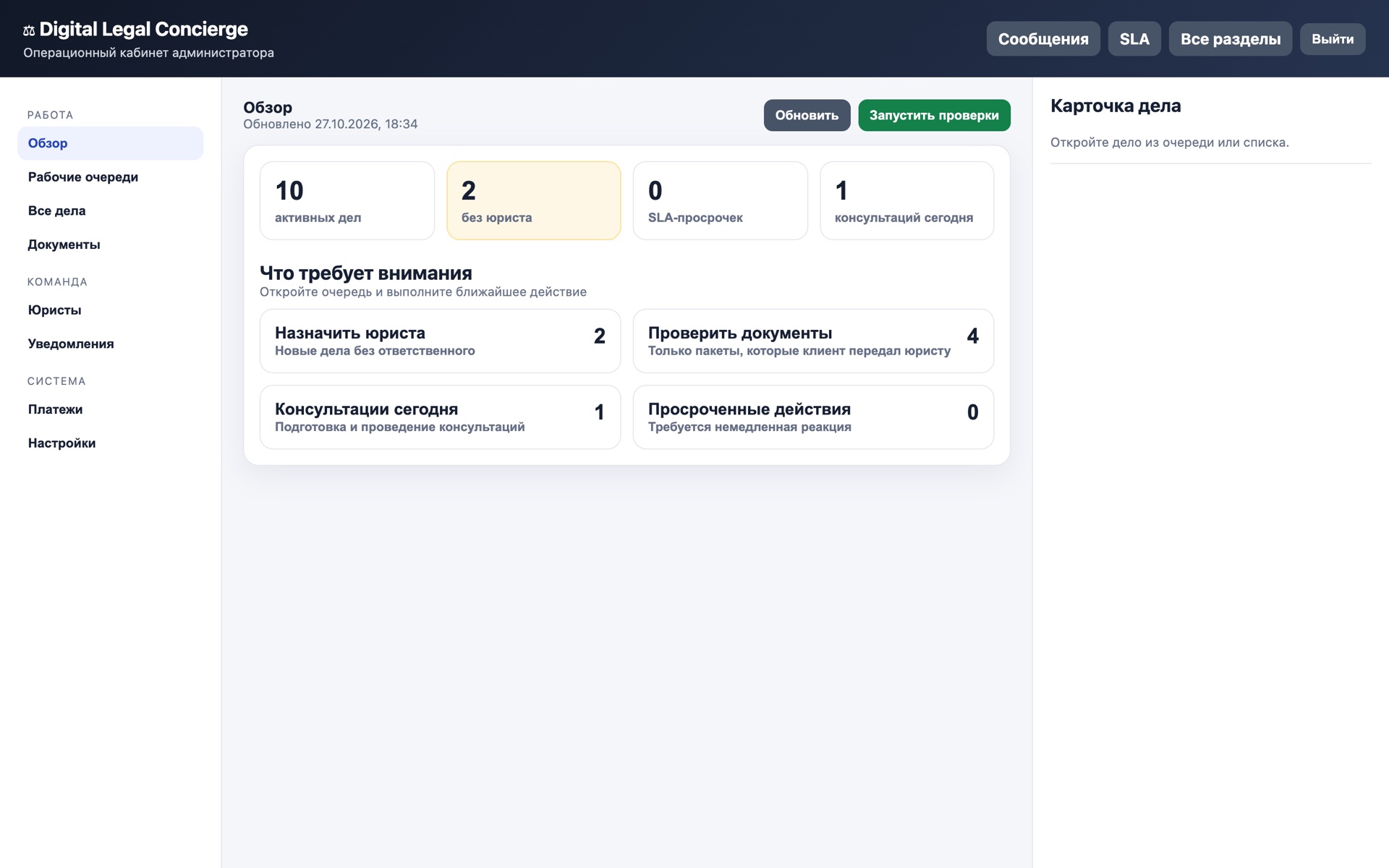
- Administrator overview. Active cases, cases without a lawyer, missed deadlines and the day’s consultations. Work queues open in one click.
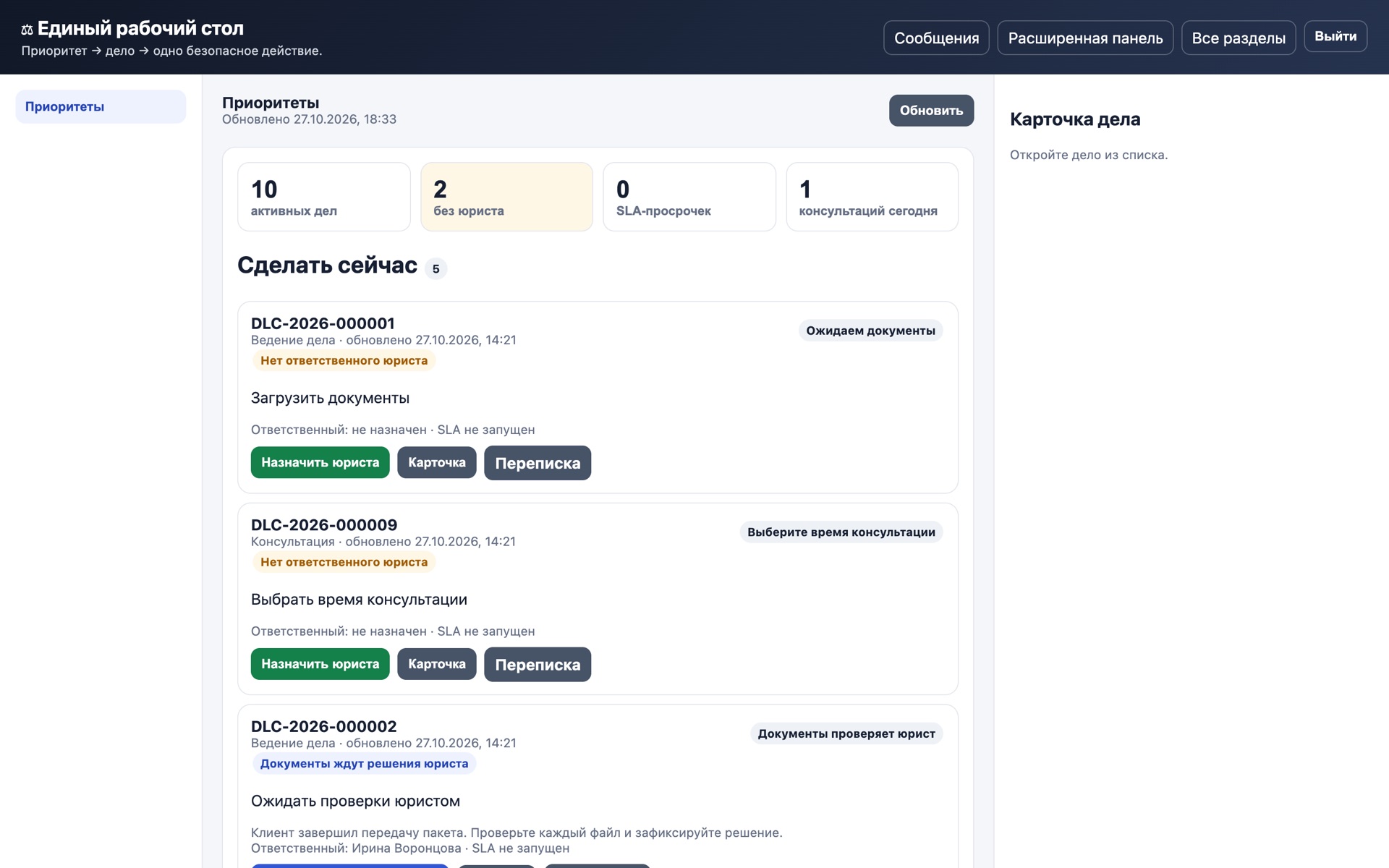
- Unified workdesk. A “Do now” list: each case has a status, the reason it needs attention and a safe action: assign a lawyer, open the card, jump to the conversation.
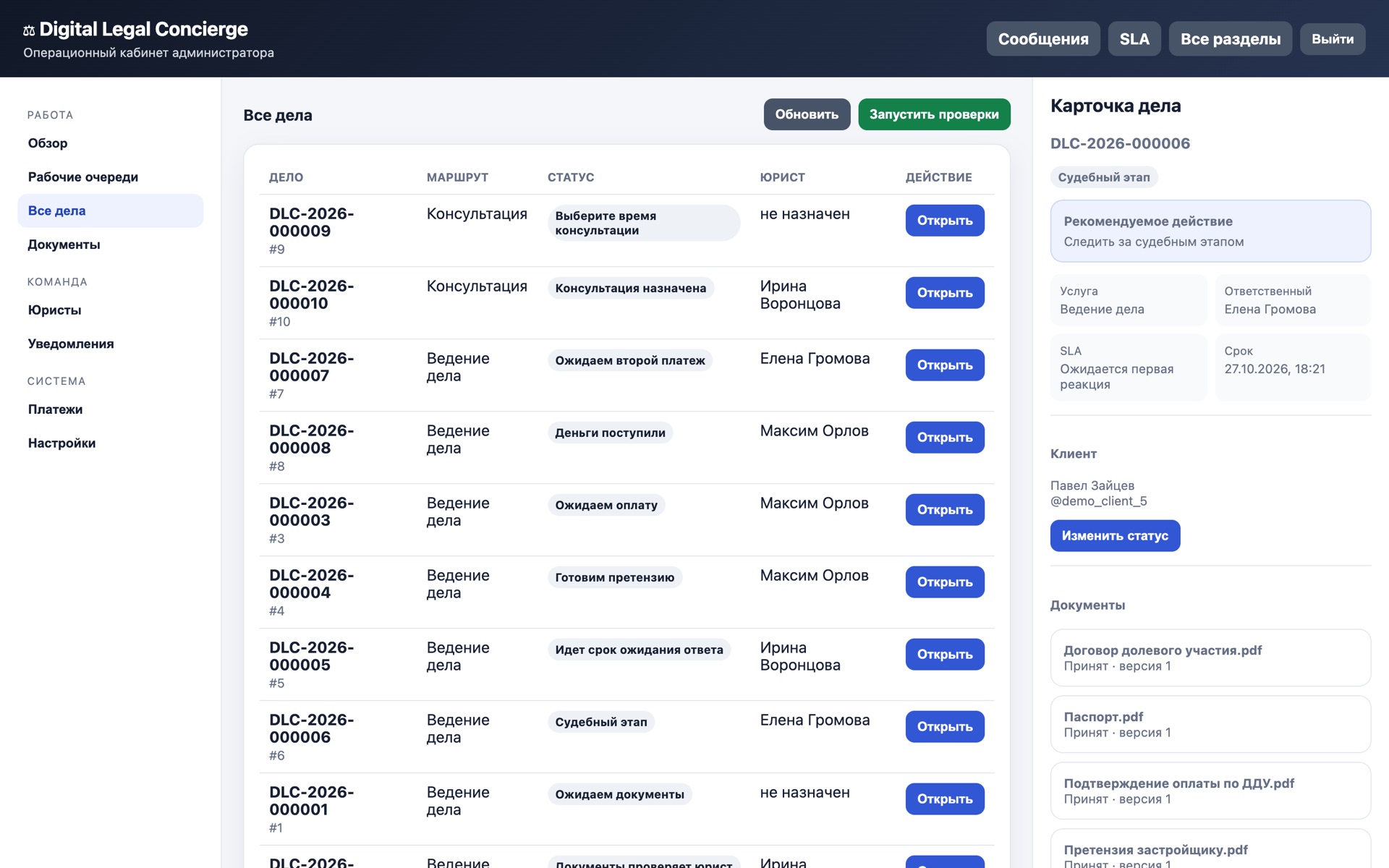
- Case card. Stage, recommended action, responsible lawyer, response deadline, client and every document of the case in one window.
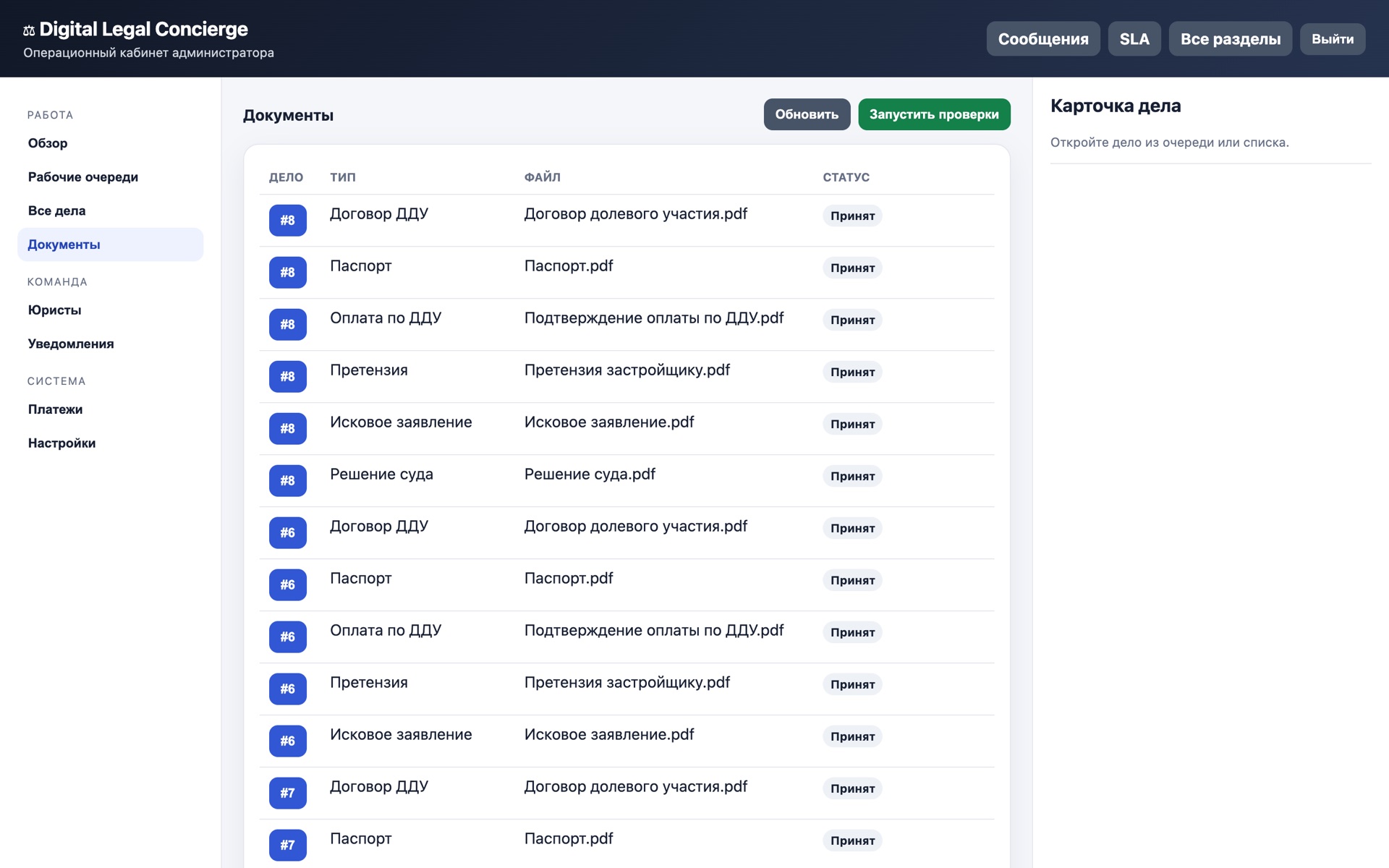
- Documents. Documents of all cases with type, file name and review status: “Accepted”, “Under lawyer review”, “Re-upload needed”.
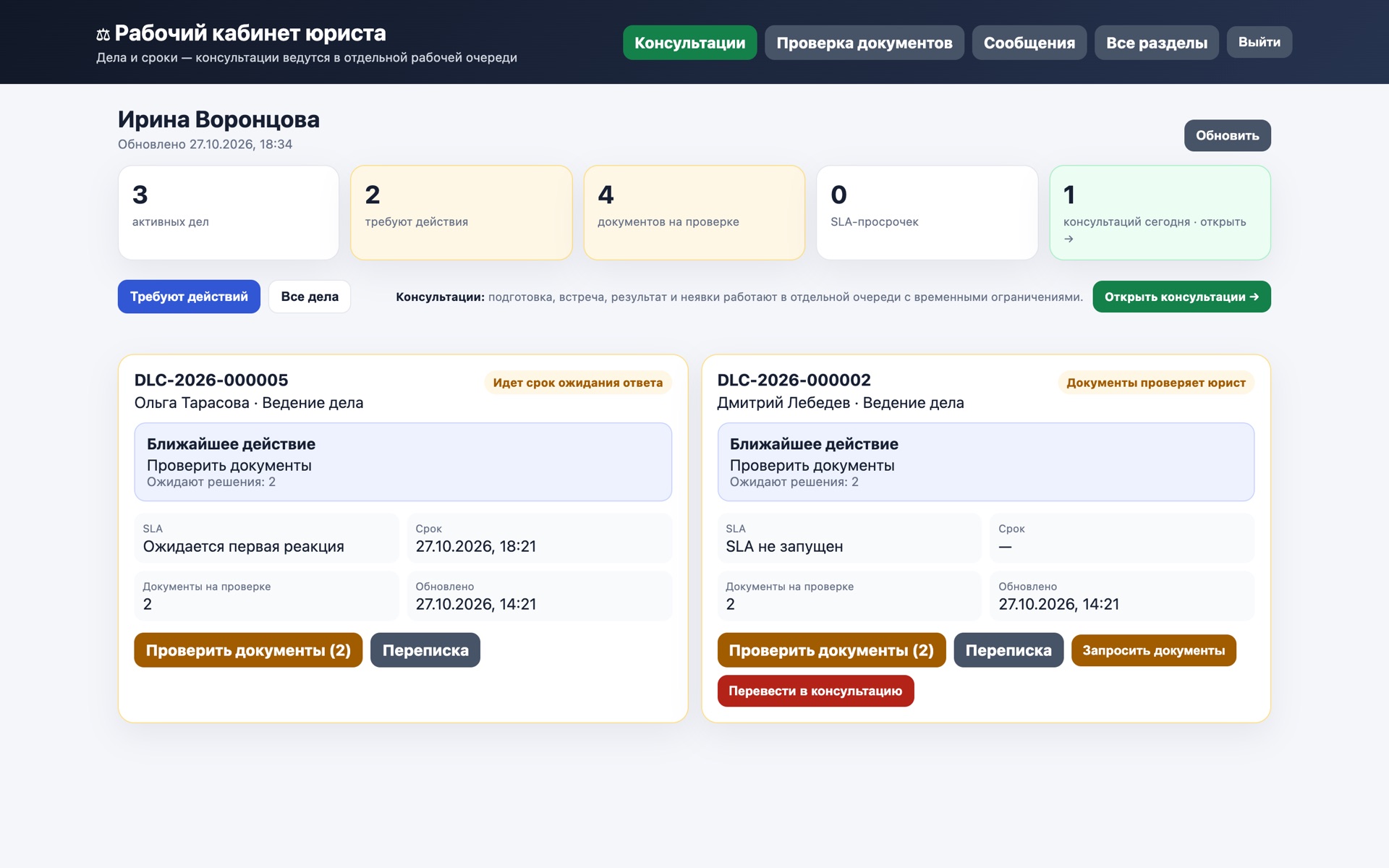
- Lawyer workspace. A lawyer sees only their own cases: what needs action, how many documents wait for a decision and which consultation is today.
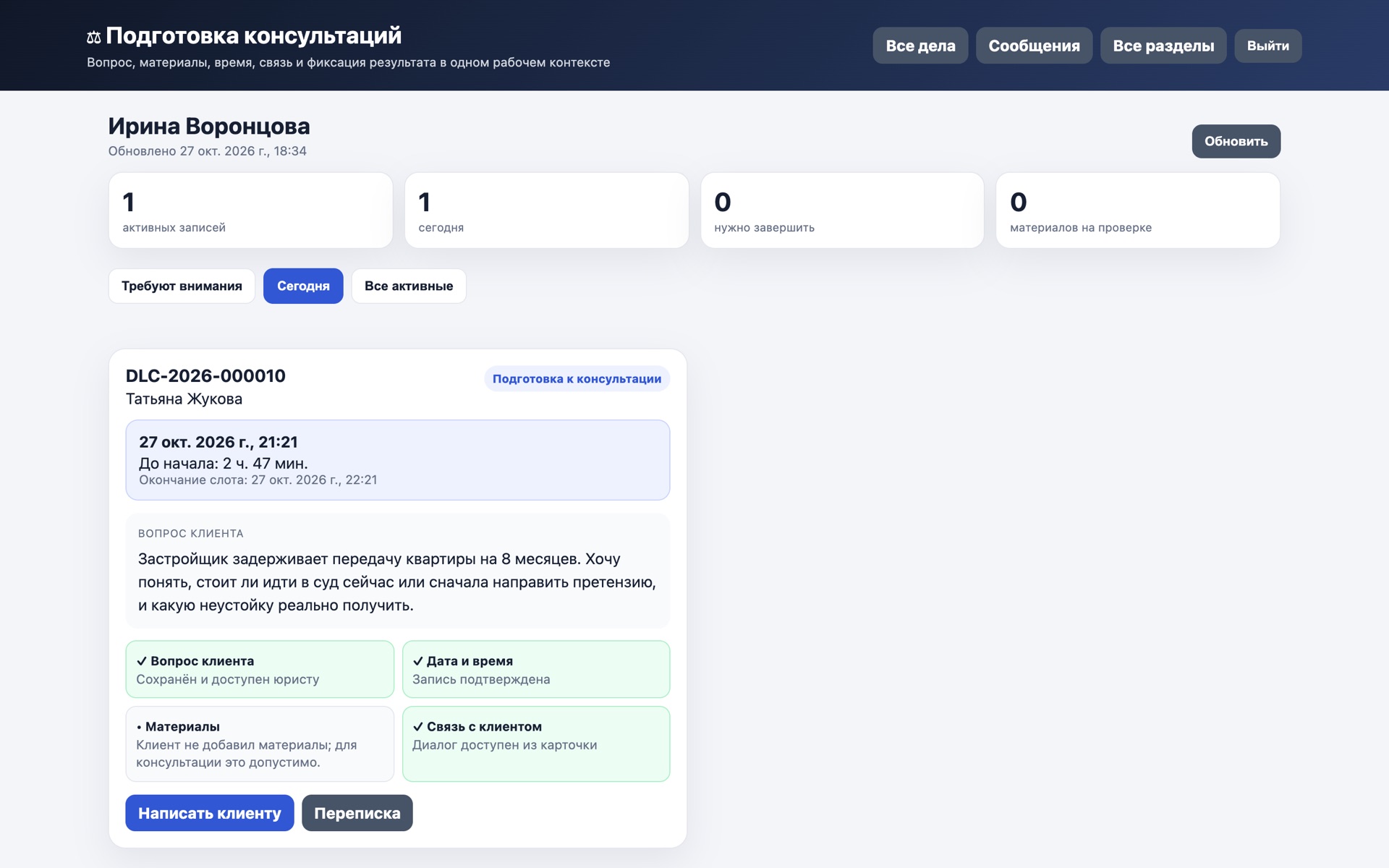
- Consultation preparation. The client’s question, time and countdown, readiness checklist and a “Write to client” button in one working context.
Video, 36 seconds: the administrator workdesk, a case card and the lawyer workspace in the running system. Demonstration data.
08 — Next step
If this is close to you
Tell us what interests you: running the system in your firm or learning more. We reply personally.